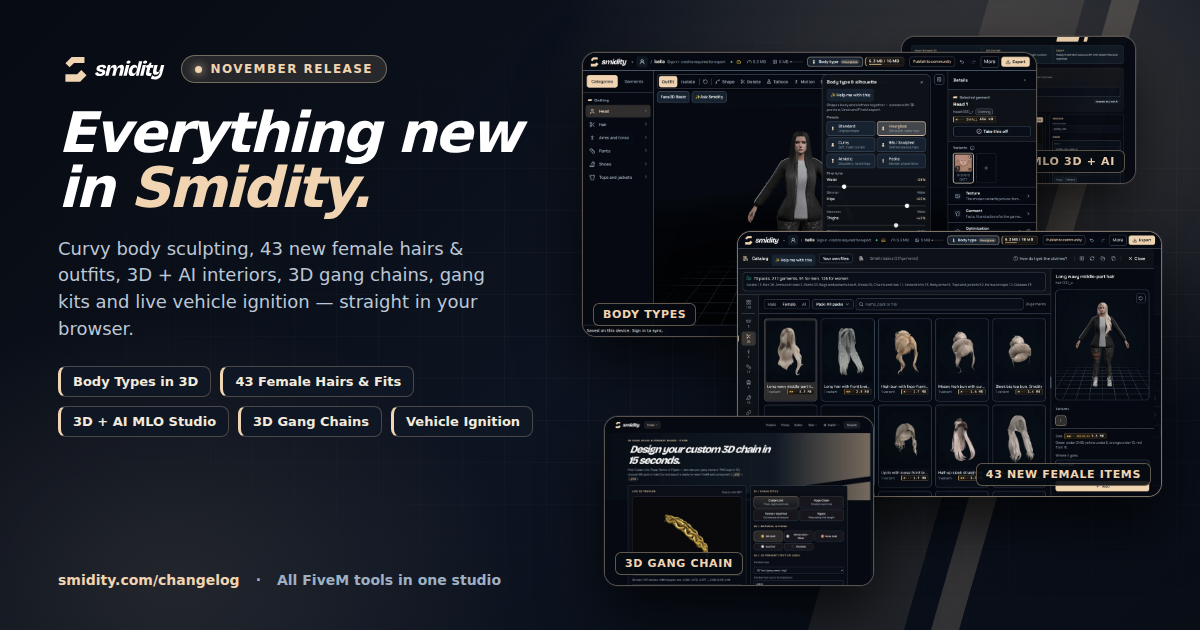
Our biggest release yet on smidity.com. Sculpt curvy silhouettes live in 3D, style your character with 43 new female hairstyles and outfits, create full gang kits and 3D chains, design complete MLO interiors with AI and start vehicles right in your browser.
Our biggest release yet on smidity.com. Sculpt curvy silhouettes live in 3D, style your character with 43 new female hairstyles and outfits, create full gang kits and 3D chains, design complete MLO interiors with AI and start vehicles right in your browser.
Body Types in Ped Editor: pick Curvy, Hourglass, BBL, Athletic or fine-tune proportions live in 3D with clothes on.
43 new unique female hairs & outfits: 26 new hairstyles and 17 garments ready to preview live and export.
3D Gang Chain & Gang Kit Builder: design 18K gold / Iced Out chains and matching gang hoodies, vehicles, plates and weapons from one logo.
MLO 3D Studio with AI & Walkstyles: generate complete interiors with AI or build custom walkstyles and emotes in seconds.
Live Vehicle Ignition, Weapon Effects & server tools: start engines in 3D, style custom weapons, and build loading screens or clothing packs in your browser.
Our biggest tool drop yet on smidity.com — build in seconds what normally costs hundreds from developers. All four are included in the Permanent Export License (Black Week $29 / 299 kr until Nov 30).
Gang Kit Builder (/en/tools/gang-kit): 1 logo → full FiveM bundle with clothing, plate, vehicle livery, weapon skin and branding (9 .ytd + fxmanifest.lua).
3D Gang Chain (/en/tools/chain): Cuban Link, Rope, Tennis and Figaro in 18K gold/Iced Out with 3D text or PNG logo and 360° preview.
Walkstyles & Emotes (/en/tools/animation): Heavy/Gorilla, Boss Strut, Tactical, Swagger & more or video-to-emote as .ycd with ready rpemotes Lua.
Server-Ready Optimiser (/en/tools/optimizer): 16 MiB streaming audit, 1-click compression and shareable verified report link for server staff.
Major smidity.com upgrade: pay exports straight from your server’s shared credit pot, share 3D previews by link, try tools in one click and get sharper AI help in all 8 languages.
Server & team (/account#team): pool credits in a shared pot with roles, monthly limits and one-time invites, and pay exports straight from the team pot.
Shareable 3D preview links (/preview/<code>): send a read-only 3D link to server owners or teammates before exporting.
1-click “Try with an example” in more tools, including Face3D Basic and the Weapons Editor, across all 8 languages.
Upgraded Smidity-AI across all 8 languages: double the guide context, FiveM error-code help, quick-question chips and 1-click actions for tools, Light performance mode and sliders.
Smoother Discord-style startup scene with live status and tips, legal links inside Settings, and a complete embedded Microsoft certificate chain in Smidity.exe.
New native Direct2D startup scene with breathing S-emblem, orbiting progress ring, live boot status and quick tips.
Smooth 200 ms crossfade into the workspace (respects reduced-motion settings in-app and in Windows).
New “About & Legal” section in Settings with Terms, Privacy Policy, Right of Withdrawal and company info (also in Ctrl+K).
Complete embedded Microsoft Trusted Signing certificate chain (4 certificates) so Windows consistently verifies Publisher: Zewinu AB.
A dedicated native Settings view built directly into the Windows app without reloading your open tabs.
Open Settings from the sidebar gear icon, Ctrl+, or the Ctrl+K command palette.
Control language (Auto / Swedish / English), startup view, interface zoom (80–150%), default sidebar mode, reduced motion and multi-tab close confirmation.
Manual “Check for updates” button, automatic startup update toggle and safe web cache clearing that keeps you signed in.
Streamlined sidebar footer and slimmer status bar that keep focus on your work.
Sync projects in EU cloud storage, build freemode faces locally from a photo and inspect vehicle meta files at a glance.
1 GB free EU cloud storage for every account, with larger quotas included in plans. Plans include 10, 50, 200 or 1,000 GB, and Pro and Studio storage is shared with the team. Sync never overwrites a change without asking.
Face3D Basic runs entirely locally in your browser – your photo never leaves your computer. Hairstyle, hair colour and beard are included.
New Vehicle Studio meta overview with one-click creation of missing meta files, plus .dat54 support in the Audio Editor.
The terms and privacy notice now include a section on cloud storage (version 2026-11-04).
Repair automatically now works when a texture reference is missing or broken, including for the head.
If a garment has no colour image at all, you can choose Export without the parts missing colour. The rest of the ped is exported and you see exactly what was removed before you download.
Your original is never changed.
Everyone who was signed in and had an export fail between 15 October and 4 November has received 200 credits as an apology.
Focused tools for creating, checking and preparing game assets, together in one browser-based studio.
Shape a ped in your browser: clothing, face, hair and other details in the ped editor.
Asset Check inspects a ped archive’s files and metadata and gives you a shareable report link. The report shows findings and file metadata, not the ped files themselves.
Texture Press turns PNG textures into YTD, Plate Studio creates plate artwork as a PNG with an editable specification, and model conversion turns a static OBJ or GLB model into YDR, YTD and a report.
AI texture assistance that suggests edits and generates texture images.
The interface is available in English and Swedish, and credit packages can be bought by card through Stripe or with Swish.